
Amazon Shopping
Amazon Mobile LLCShopping
4.4355.40K Reviews
- Version
- 32.19.0.100
- Installs
- 1.00B
- Age Rating
- Teen
Screenshots
Our Review of Amazon Shopping
 Analysis by Appyee
My main takeaway is that Amazon Shopping works best as a fast route from “I need this” to a shortlist of options, not as a reason to stop comparing. I find it especially useful when I already know roughly what I want, need to check a product while away from home, or want to keep several possible purchases in one place. Its enormous catalogue is convenient, but the app still asks you to make careful choices: similar-looking listings can differ in seller, condition, delivery details, and what is actually included.
A useful companion for planned and quick purchases
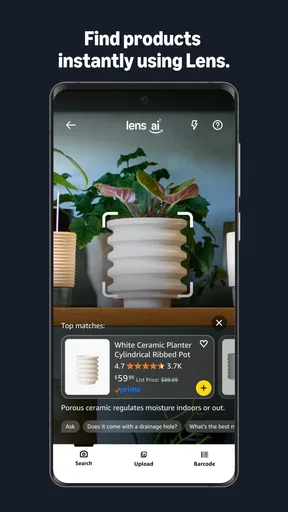
In everyday use, I think of the app as a flexible shopping desk. I can search for a household replacement, save a gift idea before I forget it, or check a familiar item while standing in a shop. That last situation is where the barcode scanner can be genuinely useful: it gives me a quick online comparison point, but I treat the result as a prompt to inspect the listing rather than proof that buying online is automatically better. A matching product name does not, by itself, settle questions such as seller, condition, delivery timing, or whether the listing is for the exact size or version I need.
A realistic example is running low on a regular household item while making a shopping list. I can search for it, compare the available options, and put a likely choice in the cart without interrupting everything else I am doing. If I am not ready to buy, a wish list is a more sensible place to keep it. That small separation between “considering” and “ordering” helps me avoid treating every interesting result as an immediate purchase.
How I compare listings instead of just tapping the first result
The app is strongest when I arrive with a clear description or a specific product in mind. Search can surface many close alternatives, so I slow down for purchases where details matter. I check the product title and description against what I actually need, then look at the seller and the delivery information shown on that listing. For items with several versions, I make sure the selected option is the right one before checkout. This is a modest habit, but it prevents the common mistake of ordering something that looked right in a thumbnail and was not quite right in practice.
I also use wish lists as a lightweight comparison tool. Rather than opening and losing track of several candidates, I can keep possibilities together and return to them when I have more time. It is not a substitute for a careful comparison, and it does not make every listing equally trustworthy or suitable; it simply gives me a place to pause before committing. For a planned purchase, that pause is one of the app’s most useful features because it turns browsing into a decision I can revisit instead of a string of impulse taps.
Where it fits among shopping alternatives
Compared with going directly to a retailer’s own app or website, Amazon is often the more convenient place to begin when I want to see a broad mix of products in one search. That breadth is useful for ordinary items and for discovering alternatives, but it can also make the decision noisier. A specialist retailer may be a better choice when I want focused product guidance, a particular service, or a narrower range that is easier to evaluate. For a purchase where fit, materials, or specialist advice matter, I would not let the convenience of a large marketplace replace checking the relevant details elsewhere.
Compared with visiting a physical shop, the app is better for browsing at an odd moment and checking options without travelling. A shop can still win when I need to handle an item, judge its size in person, or take it home immediately. I see the barcode scanner as a bridge between those approaches: it can help me compare while I am already shopping, but the sensible choice may still be to buy in person. The app is useful precisely because it gives me another option, not because it makes every other way of shopping obsolete.
Things I check before placing an order
Before I pay, I take a moment to review the whole order rather than relying on the speed of checkout. I confirm that the selected product variation is correct, check the seller and delivery details attached to that offer, and look over the cart for accidental extras or duplicates. This is especially worthwhile when I have added items at different times or searched for a replacement using a broad phrase. A fast checkout is helpful, but it also means the final review is the point where I catch an avoidable mismatch.
Notifications can be handy when they relate to an order or a product I genuinely want to follow, but I prefer to be selective. A stream of deal prompts can turn useful shopping into distracting browsing, and a reminder is not a reason to buy something I do not need. I treat alerts as cues to check the app when convenient, not as deadlines. If I am trying to keep spending deliberate, saving an item and returning to it later works better for me than reacting to every promotion.
Who should use it, and who may prefer another route
I would recommend the app to people who already shop online, want one familiar place to browse a wide selection, or appreciate being able to track an order from a phone. It also suits anyone who often needs to compare a product while out, or who likes keeping possible purchases in wish lists instead of relying on memory. Amazon Shopping is a free shopping app from Amazon Mobile LLC, and its broad reach is reflected in its 1 billion-plus installs and 4.4 average rating from around 4.7 million ratings. It is rated Teen, so families should take that content rating into account when deciding who will use it.
I would hesitate to recommend it as the only shopping option for someone who dislikes large catalogues, finds frequent product suggestions distracting, or wants hands-on advice before choosing. In those cases, a specialist shop or a local store may make the decision easier. The app is also less helpful when I have no clear idea what I want: endless scrolling can feel more like browsing for its own sake than solving a practical need. A short search with a specific requirement tends to work better than opening it without a plan.
Version, cost, and a practical expectation
The current version is 32.13.0.100 and requires Android 12 or later. The app itself is free to download, while in-app purchases are listed from $0.99 to $149.99 per item; I would check any purchase details in context rather than assume every optional item is relevant to ordinary shopping. The app was released on December 10, 2014, and its long presence in mobile shopping helps explain why it feels familiar to many people, although familiarity does not remove the need to check each order carefully.
For a new user, the practical question is whether the app makes a regular task easier. I would start with a purchase I already understand, such as finding a known household item, then try saving a second option in a wish list rather than buying immediately. That gives a fair sense of how search, product pages, the cart, and order tracking fit together without turning the first visit into a large shopping session. If you mainly want to browse in person, compare specialist advice, or avoid marketplace-style choice, you may be happier with a different route.
Design and Interface
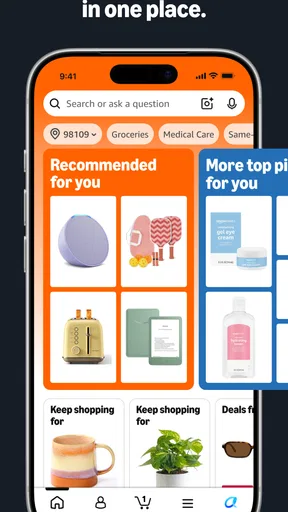
First off, the design. When I first opened the Amazon Shopping app, I was greeted with a clean and intuitive interface. Everything is laid out so logically that even someone who's not tech-savvy can navigate it with ease. The home screen gives you quick access to your orders, wish lists, and cart, which saves a ton of time.
Features Galore
Now, let’s talk features. One thing I really appreciate is the barcode scanner. Ever been in a store and wondered if you could get a better deal online? Just scan the barcode, and boom! You get all the details, and sometimes a better price, right there in the app. It’s like having a personal shopping assistant in your pocket.
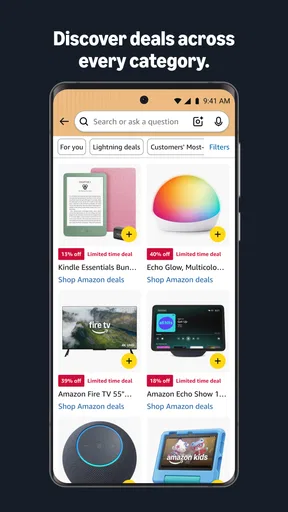
The app also keeps you updated with personalized notifications. Whether it’s a lightning deal you don’t want to miss or a reminder to reorder your favorite items, the app has got your back. It's like it knows me better than I know myself!
User Experience
One thing I noticed is how smooth the checkout process is. Sometimes, online shopping can feel like a maze, but here, it’s just a few taps and you’re done. Plus, the variety of payment options is a huge plus. Whether you’re using a credit card, PayPal, or even gift cards, the app accommodates it all.
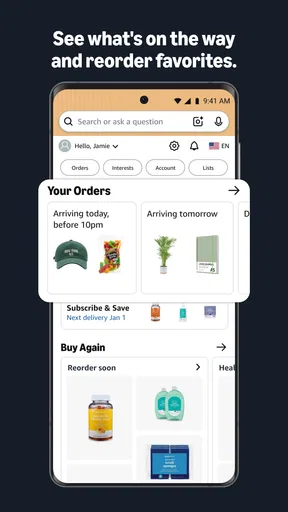
And let’s not forget about the delivery tracking feature. I love being able to see exactly where my package is and when it’s expected to arrive. It’s like having a little sneak peek into the logistics world!
Final Thoughts
Overall, the Amazon Shopping app is a must-have for anyone who values convenience and variety. With its user-friendly design and plethora of features, it’s truly transformed the way I shop. Whether you’re a frequent buyer or just need to grab something in a pinch, this app has got you covered.
If you haven’t tried it yet, I’d say give it a go. It might just become your go-to shopping solution. Happy shopping, folks!
Privacy and Permissions
See what permissions an app requests and how it handles your data.
- Identity
- find accounts on the device, add or remove accounts
- Contacts
- find accounts on the device, read your contacts
- Location
- approximate location (network-based), precise location (GPS and network-based)
- Phone
- read phone status and identity
- Photos/Media/Files
- read the contents of your USB storage, modify or delete the contents of your USB storage
- Storage
- read the contents of your USB storage, modify or delete the contents of your USB storage
- Camera
- take pictures and videos
- Microphone
- record audio
- Wi-Fi connection information
- view Wi-Fi connections
- Device ID & call information
- read phone status and identity
- Other
- view network connections, create accounts and set passwords, pair with Bluetooth devices, access Bluetooth settings, connect and disconnect from Wi-Fi, control flashlight, full network access, change your audio settings, control Near Field Communication, run at startup, use accounts on the device, control vibration, prevent device from sleeping, install shortcuts, Google Play license check
How Amazon Shopping Compares
Full ComparisonChoose Amazon for broad selection and order tracking, Temu for deal-focused browsing, or AliExpress for global variety and buyer protection.
| App | Developer | Rating | Price |
|---|---|---|---|
 Amazon ShoppingThis App | Amazon Mobile LLC | 4.4 | Free |
 Temu: Shop Like a Billionaire | Temu | 4.4 | Free |
 AliExpress - Shopping App | Alibaba Mobile | 4.2 | Free |
Verdict
Strengths of Amazon Shopping
- Wide product selection for all needs.
- User-friendly interface with intuitive navigation.
- Easy order tracking and updates.
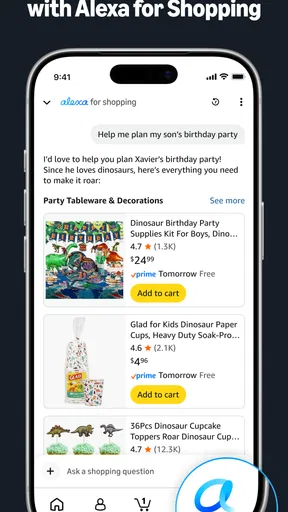
- Seamless integration with Alexa for voice shopping.
- Exclusive deals and discounts for Prime members.
Limitations of Amazon Shopping
- Customer service can be hard to reach.
- Quality of some products varies widely.
- In-app ads can be intrusive.
- Limited payment methods in some regions.
- Returns process can be cumbersome.
Other Releases by Amazon Mobile LLC
View All
MX Player
Video Players & Editors4.2

Prime Video
Entertainment4.7

Prime Video
Entertainment3.1

Amazon Kindle: Reading App
Books & Reference4.8
Similar Picks in This Category
View All
SHEIN-Shopping Online
Roadget Business PTE. LTD.4.8


Mercado Libre: Compras online
Mercado Libre4.8

Wish: Shop and Save
Wish US Holdings LLC4.7

Alibaba.com - B2B marketplace
Alibaba Mobile4.4

AliExpress - Shopping App
Alibaba Mobile4.2
You May Also Like
View All


Frequently Asked Questions
What features does the Amazon Shopping app offer?
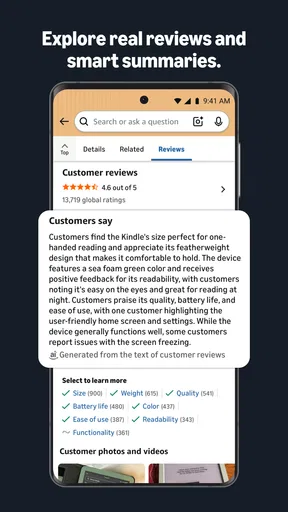
The Amazon Shopping app offers a wide range of features, including easy access to millions of products, personalized recommendations, and secure payment options. Users can track orders in real-time, read reviews, and even use Alexa voice shopping. The app also supports barcode scanning for quick price checks and product details.
Is the Amazon Shopping app safe to use for online purchases?
Yes, the Amazon Shopping app is designed with security in mind. It uses secure servers to encrypt your personal and payment information. Additionally, Amazon’s A-to-Z Guarantee ensures that users can shop with confidence, providing refunds for items not delivered or as described. Always ensure your app is up to date for optimal security.
Can I use the Amazon Shopping app internationally?
The Amazon Shopping app can be used internationally, but availability of products and services may vary by country. Users can switch between different Amazon marketplaces within the app to shop in various regions. However, shipping fees and delivery times may differ depending on the location and the seller's shipping policies.
How can I manage my orders through the Amazon Shopping app?
Managing orders on the Amazon Shopping app is straightforward. Users can view their order history, check delivery statuses, and modify or cancel orders before shipping. The app also allows users to initiate returns and refunds if products are unsatisfactory. Notifications keep you updated on order progress and delivery.
What devices are compatible with the Amazon Shopping app?
The Amazon Shopping app is compatible with most Android and iOS devices. It requires Android version 5.0 or later and iOS 12.0 or later. The app is optimized for smartphones and tablets, ensuring a seamless shopping experience across different screen sizes. Regular updates enhance compatibility and performance.
